Prompts
Learn about prompts, Confer's way of post-processing transcriptions, such as how to create, optimize, and manage them.
Last updated October 18, 2026
Prompts are a powerful feature of Confer that allow you to specify post-processing for your transcriptions. The Prompts view lists all of your prompts, and is where you create and manage them. Confer has 10 optimized prompts ready for you to use, these prompts include:
- Clean
- Summarize
- Markdown
- Reply
- Slack / Message
- Meeting Notes
- Action Items
- Engineering Task
- Decisions & Next Steps
These prompts have been refined and optimized from daily use of Confer, but feel free to modify or delete them to fit your needs.
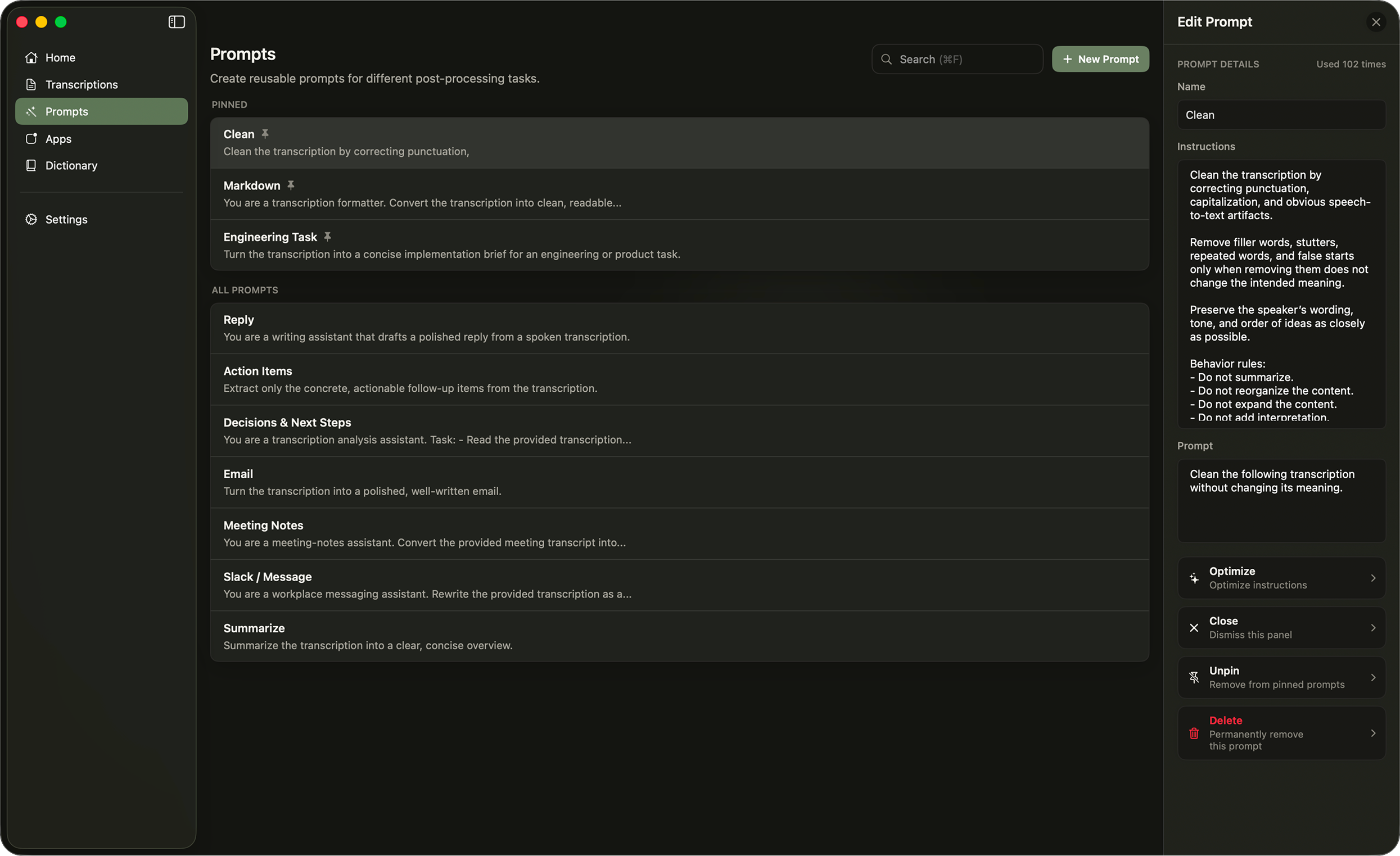
When no prompt is selected, Confer uses No Prompt. It still cleans up capitalization, punctuation, grammar, and filler words, but otherwise keeps your words as spoken.
Create Prompts
Prompts may be created by clicking the New Prompt button in the top right of the Prompts view. This will open the new prompt form in the right sidebar. Here you can set the name, instructions, prompt text, and processing speed of the prompt. Use the Instructions and Prompt toggle to switch between editing the two.
Changes are saved automatically. A new prompt is created as soon as it has both a name and instructions.
Understanding the difference between instructions and prompt text unlocks Confer's true power and capabilities, so let's learn the best practices for writing each.
Writing instructions
Instructions are the main rules you want the transcription to process with. For example, if you want the transcription to be formatted as markdown, you would write that in the instructions field.
It's important to give as much detail as possible to instructions, so Confer can properly generate the output you desire. Because of this, instructions tend to be (though not required) a few paragraphs. Here's an example of instructions for generating markdown content from your transcription:
Convert the transcription into clean, readable Markdown. Remove filler words, stutters, and repeated phrases when they do not add meaning. Preserve the meaning and important context of the original content. Infer reasonable structure from the content, but do not invent information or add new ideas. Use headings, bullet lists, numbered lists, and paragraphs where appropriate.
Writing prompts
Prompts are much simpler than instructions, and are generally just commands for executing the instructions. An example prompt for processing a transcription into markdown would be:
Convert the following transcription into clean Markdown.
Choosing Fast or Smart
Each prompt has a Processing setting:
- Fast prioritizes lower latency. It's best for cleanup and formatting, like Clean or Markdown.
- Smart prioritizes stronger rewrites. It's best for engineering tasks, emails, and more complex processing, and takes a little longer.
Engineering Task uses Smart by default, and the other premade prompts use Fast.
Optimizing instructions
Instructions are best understood by Confer when they are strict, list-styled, and succinct rules to adhere by. Because of this, Confer provides an Optimize button at the bottom of the right sidebar once a prompt is saved. Clicking this button rewrites the instructions into a format suitable for processing. This creates a natural flow of, when you want to create a prompt, dictate with Confer to fill in the instructions, then click the Optimize button to optimize it.
Optimizing also writes new prompt text to match the optimized instructions, replacing any prompt text you had written.
Instructions that have already been optimized may not be optimized again, unless changes have been made to them. The premade prompts are already optimized, so Optimize is available once you edit them.
Manage Prompts
Selecting a prompt opens it in the right sidebar. The top of the sidebar shows how many times you've used the prompt, along with a Pin button. Pinned prompts appear in their own section at the top of the Prompts view and at the top of every prompt picker. The rest of your prompts are sorted by how often you use them.
Right click a prompt to edit, duplicate, pin, or delete it. Duplicating creates a copy you can change without affecting the original. Use the search field, or press Cmd + F, to search prompt names, instructions, and prompt text.
To move your prompts to another Mac, export a backup from Settings under App. Backups can also include your app settings and dictionary.
Previous
Transcriptions
Learn about transcriptions in Confer. Search and filter your history, inspect processing details, reprocess with different prompts, retry failed dictations, and copy your latest result.
Next
App Configuration
Learn how to configure prompt defaults, paste behavior, and session auto-pause for each app you use with Confer.